Pages

Friday, October 31, 2014

How to implode array in delphi

As in the previous post how to explode some string in delphi, we can also make the reverse, it is implode. In delphi we can make implode function as in php.

Below is the function:

//////////////////////////////////////////////////////////////////////////
// Procedure - implode
// Author    - Ronald Buster
// Remarc    - PHP like implode function
//
// Returns a string containing a string representation of all the array
// elements in the same order, with the glue string between each element.
//////////////////////////////////////////////////////////////////////////

function implode(const glue: string; const pieces: array of string): string;
var
  I: Integer;
begin
  Result := '';
  for I := 0 to High(Pieces) do
    Result := Result + Glue + Pieces[I];
  Delete(Result, 1, Length(Glue));
end;

To use function above you can copy the sample code below :

procedure TForm1.Button1Click(Sender: TObject);
var
  ls_glue:string;
  arr_fruit:array[0..3] of string;
begin
  ls_glue := ', ';
  arr_fruit[0] := 'banana';
  arr_fruit[1] := 'mango';
  arr_fruit[2] := 'pear';
  arr_fruit[3] := 'orange';

  ShowMessage('Here are my favourite fruit: ' + implode(ls_glue, arr_fruit));
end;
Thanks to Ronald Buster for this function

Friday, September 26, 2014

How to explode some string in delphi

How to explode some string in delphi

In delphi, you can make a function explode as in php, copy the code below to do that :

function explode(const separator, s: string; limit: Integer = 0): TDynStringArray;
var
  SepLen: Integer;
  F, P: PChar;
begin
  SetLength(Result, 0);
  if (S = '') or (Limit < 0) then
    Exit;
  if Separator = '' then
  begin
    SetLength(Result, 1);
    Result[0] := S;
    Exit;
  end;
  SepLen := Length(Separator);

  P := PChar(S);
  while P^ <> #0 do
  begin
    F := P;
    P := AnsiStrPos(P, PChar(Separator));
    if (P = nil) or ((Limit > 0) and (Length(Result) = Limit - 1)) then
      P := StrEnd(F);
    SetLength(Result, Length(Result) + 1);
    SetString(Result[High(Result)], F, P - F);
    F := P;
    while (P^ <> #0) and (P - F < SepLen) do
      Inc(P);
  end;
end;

How to use it? 

To use function above you can call it from button click as example below :
procedure TForm1.Button1Click(Sender: TObject);
var
  ls:string;
  i:integer;
  arr:TDynStringArray;
begin
  ls := 'apple;banana;mango;orange;melon';
  arr := explode(';', ls);
  for i := 0 to Length(arr)-1 do
    ShowMessage(arr[i]);
end;

Thursday, September 25, 2014

How to remove line breaks in delphi

How to remove line breaks from text in Delphi? 

You can use stringreplace function.
  • function StringReplace (const SourceString, OldPattern, NewPattern : string; Flags : TReplaceFlags) : string;
The StringReplace function replaces the first or all occurences of a substring OldPattern in SourceString with NewPattern according to Flags settings. The changed string is returned.

The Flags may be none, one, or both of these set values:
  • rfReplaceAll : Change all occurrences
  • rfIgnoreCase : Ignore case when searching
These values are specified in square brackets.

Below are the sample code :
var
   before, after : string;
begin
   before:='Some text with' + #10#13 + 'line break';
   after := StringReplace(StringReplace(before, #10, ' ', [rfReplaceAll]), #13, ' ', [rfReplaceAll]);
   ShowMessage(before);   
   ShowMessage(after);
end;


Wednesday, September 24, 2014

How to load sql file to ado command

Here is script to load sql file to adocommand at runtime.

var
f:TFileStream;
s:string;
begin
f:=TFileStream.Create('sql_commands.sql',fmOpenRead);
try
SetLength(s,f.Size);
f.Read(s[1],f.Size);
finally
f.Free;
end;
ADOCommand1.CommandText:=s;

Tuesday, September 23, 2014

How to set SQL Server Database Option

Dear Reader,...
Sometimes we need to set SQL Server database option because there is error related on it based on purpose. In this article, we will discuss about how to SQL Server Database Option.

For the first time, you need to query the options of database as below
SELECT
    database_id,
    name, 
    is_ansi_nulls_on,
    is_ansi_padding_on,
    is_ansi_warnings_on,
    is_arithabort_on,
    is_concat_null_yields_null_on,
    is_numeric_roundabort_on,
    is_quoted_identifier_on
FROM sys.databases
where name='[database_name]'
You will get the result of every options that queried. To change the value of options, simply execute the script below
ALTER DATABASE [database_name] SET ANSI_NULLS ON;
GO
ALTER DATABASE [database_name] SET ANSI_PADDING ON;
GO
ALTER DATABASE [database_name] SET ANSI_WARNINGS ON;
GO
ALTER DATABASE [database_name] SET ARITHABORT ON;
GO
ALTER DATABASE [database_name] SET QUOTED_IDENTIFIER ON;
GO
ALTER DATABASE [database_name] SET CONCAT_NULL_YIELDS_NULL ON;
GO
ALTER DATABASE [database_name] SET NUMERIC_ROUNDABORT OFF;
GO

Thursday, August 14, 2014

How to create local repositoy RHEL 6

As in the post How to create local repositoy SLES 10 we also can do the same thing on RHEL (Redhat Enterprise Linux) 6 using yum. Here are the steps :
  1. Install the createrepo package:
  2. Copy all of the packages into one directory, such as /home/choirul/local_repo/ 
  3. Run the createrepo --database command on that directory:
    createrepo --database /home/choirul/local_repo
  4. Create a new file in /etc/yum.repos.d, with the following contents:
    # cat /etc/yum.repos.d/local.repo
    [local]
    name=Repository from DVD
    baseurl=file:/home/choirul/local_repo/
    enabled=1
    gpgcheck=1
    gpgkey=file:/home/choirul/local_repo/RPM-GPG-KEY-release
  5. update yum with command
    yum clean all
    yum update
    yum list
  6. You can find file RPM-GPG-KEY-release in root directory of RHEL DVD
The above step is for repository that locate in folder. Beside, we also can create repositoy using iso file. Here are the steps :
  1. create mount point for repository :
    mkdir -p /path/to/repo
  2. Mount iso file on the mount point that you just created
    mount -r -t iso9660 -o loop /path/to/image/file.iso /path/to/repo
  3. If you use your cd/dvd drive, you must know where is your drive located. To know that see Linux Sysinfo command. Use this command to mount your drive
    mount -r -t iso9660 /dev/device_name /path/to/repo
  4. Choose a name for the repo file and open it as a new file
    vi /etc/yum.repos.d/dvd.repo
  5. Supply the details of the repository. For example:
    [dvd]
    name=ISO
    baseurl=file:///mnt/repo/Server
    enabled=1
    gpgcheck=1
    gpgkey=file:///etc/pki/rpm-gpg/RPM-GPG-KEY-redhat-release
    
  6. update yum
If for some reasons you need to install library, you can use command yum whatprovides [library_name] as below:
[root@short Downloads]# yum whatprovides libQtGui.so.4
Loaded plugins: presto, refresh-packagekit
1:qt-x11-4.5.3-7.fc12.i686 : Qt GUI-related libraries
Repo        : fedora
Matched from:
Other       : libQtGui.so.4
[root@short Downloads]# yum install qt-x11-4.5.3-7.fc12.i686

Wednesday, August 13, 2014

How to query data with date in mssql

It come from simple question. what is the syntax for query data with date/time filter in ms access?.

Here we will show you how to do that. It simply using query like example below :
SELECT SNo
FROM Staff
WHERE Format([ComplaintDate],"yyyy-mm-dd")>='2014-08-10'

Wednesday, March 19, 2014

How to create database link in oracle

What is database link?

A database link is a schema object in one database that enables you to access objects on another database. The other database need not be an Oracle Database system. 

How to create a database link in Oracle? 

To create database link you must specify the database link name, the remote user to connect to, the password for the remote user and the TNS service name for the database link connection. Below are the command to create database link in oracle.

create public database link mylink connect to remote_username identified by mypassword using 'tns_service_name';

How to access object in database link

To access object in database link you can use @link_name as query below :

SELECT * FROM employees@local;

for more information about oracle database link, you can find in oracle docs page. 


Tuesday, March 18, 2014

How to set ORACLE_HOME in Windows Environment Variable

What is ORACLE_HOME used for?


The ORACLE_HOME is an environment variable which is used to set and define the path of Oracle Home (server) Directory.

What is ORACLE_BASE used for?

* The ORACLE_BASE is also an environment variable to define the base/root level directory where you will have the Oracle Database directory tree - ORACLE_HOME defined under the ORACLE_BASE directory. 

How to set ORACLE_HOME in Environment variable

To set the ORACLE_HOME environment variable go to My Computer -> Properties -> Advanced -> Environment Variables -> System Variables -> New/Edit/Delete.


oracle home environment variable
After setting the environment variables, open a fresh CMD tool and check whether they set properly or not. Do not try on already opened CMD tool to make sure the variables set or not.

How to check if ORACLE_HOME is set

Open cmd and type this command
C:\echo %ORACLE_HOME% 

Tuesday, February 18, 2014

How to resolve error TNS:listener does not currently know of service requested in connect descriptor

This time we would like to look at one of problem in oracle, especially “ORA-12514: TNS:listener does not currently know of service requested in connect descriptor”.

The vast majority of the time, this error results from an incorrectly specified connect descriptor in the tnsnames.ora file. Let’s look at a very typical example then diagnose and fix it. After that we will dig in to how the listener comes to know of a service name.

For the first we need to analyze why the error occured by starting listener.
[oracle@vmlnx01 admin]$ lsnrctl start
 
LSNRCTL for Linux: Version 10.2.0.4.0 - Production on 16-MAR-2011 18:44:49
 
Copyright (c) 1991, 2007, Oracle.  All rights reserved.
 
Starting /ora00/app/oracle/product/10.2.0/db_1/bin/tnslsnr: please wait...
 
TNSLSNR for Linux: Version 10.2.0.4.0 - Production
Log messages written to /ora00/app/oracle/product/10.2.0/db_1/network/log/listener.log
Listening on: (DESCRIPTION=(ADDRESS=(PROTOCOL=tcp)(HOST=vmlnx01.vmdomain)(PORT=1521)))
 
Connecting to (ADDRESS=(PROTOCOL=tcp)(HOST=)(PORT=1521))
STATUS of the LISTENER
------------------------
Alias                     LISTENER
Version                   TNSLSNR for Linux: Version 10.2.0.4.0 - Production
Start Date                16-MAR-2011 18:44:49
Uptime                    0 days 0 hr. 0 min. 0 sec
Trace Level               off
Security                  ON: Local OS Authentication
SNMP                      OFF
Listener Log File         /ora00/app/oracle/product/10.2.0/db_1/network/log/listener.log
Listening Endpoints Summary...
  (DESCRIPTION=(ADDRESS=(PROTOCOL=tcp)(HOST=vmlnx01.vmdomain)(PORT=1521)))
The listener supports no services
The command completed successfully

It said that The listener supports no services. It means that the listener doesn't have any associates service. So the solution is we need to add a service to listener.ora as example below :

SID_LIST_LISTENER =
  (SID_LIST =
    (SID_DESC =
      (GLOBAL_DBNAME=vlnxora1)
      (ORACLE_HOME = /ora00/app/oracle/product/10.2.0/db_1)
      (SID_NAME = vlnxora1)
    )
  )

LISTENER =
  (DESCRIPTION_LIST =
    (DESCRIPTION =
      (ADDRESS = (PROTOCOL = TCP)(HOST = vmlnx01.vmdomain)(PORT = 1521))
      (ADDRESS = (PROTOCOL = IPC)(KEY = EXTPROC0))
    )
  )

Restart listener by command lsnrctl stop followed by lsnrctl start. Now you can try login using your oracle user e.g : sqlplus scott@vlnxora1

If you get this problem in your oracle client installation, please make sure that your service name is configured correctly. To check that, do the following steps :

  1. Edit tnsnames.ora
  2. Make sure that service name in connect descriptor is same with oracle database service name.
  3. To check oracle database service name, login to your oracle database server and execute the query below : 
    sqlplus / as sysdba
    select value from v$parameter where name='service_names';
    show parameter service_names;
  4. To change oracle service name you can use alter
    ALTER SYSTEM SET SERVICE_NAMES='application_a.your.domain','application_b.your.domain' SCOPE=BOTH;

Thursday, February 6, 2014

How to extract files in linux

compressed files


In linux operating system, there are some kinds of compressed files. Here they are:
  1. tar.bz2.  Below are the steps to extract .tar.bz2 file :
    • Open a terminal
    • type command "tar xvjf filename.tar.bz2"
  2. tar.gz.  Below are the steps to extract .tar.gz file :
    • Open a terminal
    • type command "tar xvzf filename.tar.gz"

Monday, December 9, 2013

How to copy file between host using scp

How to copy file between host using scp

 What is Secure Copy?

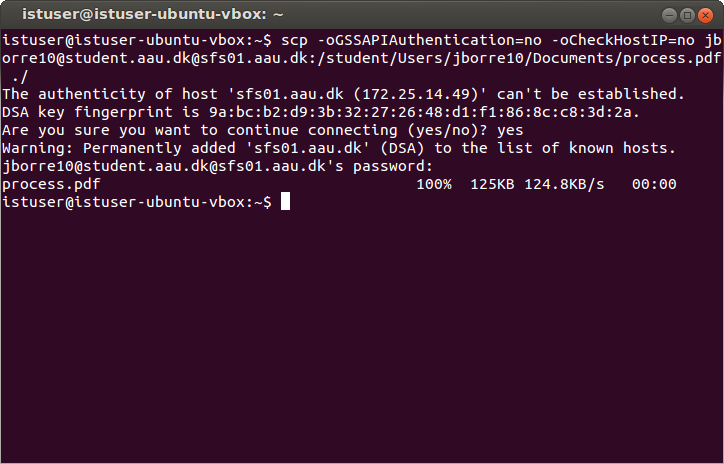
scp(Secure copy) allows files to be copied to, from, or between different hosts. It uses ssh for data transfer and provides the same authentication and same level of security as ssh. 

Below are the example syntax of scp :

Copy the file "foobar.txt" from a remote host to the local host
$ scp your_username@remotehost.edu:foobar.txt /some/local/directory

Copy the file "foobar.txt" from the local host to a remote host
$ scp foobar.txt your_username@remotehost.edu:/some/remote/directory

Copy the directory "foo" from the local host to a remote host's directory "bar"
$ scp -r foo your_username@remotehost.edu:/some/remote/directory/bar

Copy the file "foobar.txt" from remote host "rh1.edu" to remote host "rh2.edu"
$ scp your_username@rh1.edu:/some/remote/directory/foobar.txt \ your_username@rh2.edu:/some/remote/directory/

Copy the files "foo.txt" and "bar.txt" from the local host to your home directory on the remote host
$ scp foo.txt bar.txt your_username@remotehost.edu:~

Copy the file "foobar.txt" from the local host to a remote host using port 2264
$ scp -P 2264 foobar.txt your_username@remotehost.edu:/some/remote/directory

Copy multiple files from the remote host to your current directory on the local host
$ scp your_username@remotehost.edu:/some/remote/directory/\{a,b,c\} .
$ scp your_username@remotehost.edu:~/\{foo.txt,bar.txt\} .

By default scp uses the Triple-DES cipher to encrypt the data being sent. Using the Blowfish cipher has been shown to increase speed. This can be done by using option -c blowfish in the command line.
$ scp -c blowfish some_file your_username@remotehost.edu:~

It is often suggested that the -C option for compression should also be used to increase speed. The effect of compression, however, will only significantly increase speed if your connection is very slow. Otherwise it may just be adding extra burden to the CPU. An example of using blowfish and compression:
$ scp -c blowfish -C local_file your_username@remotehost.edu:~

Sunday, December 8, 2013

How to X Forwarding with Putty

Unix machines have been able to run software on a remote machine and display the GUI locally. Linux and Mac OS X support X Forwarding with no extra software.
Any terminal on Linux should do X Forwarding.
For Mac users need to run "Applications > Utilities > XTerm". In a command line terminal run "ssh -Y user@server virtualbox" and you'll be running matlab on "server" but seeing it on your desktop. In this post we will discuss about How to X Forwarding with Putty.

Windows users need two pieces of software: an secure shell program (putty) to establish the remote connection and an X Server to handle the local display(xming). Click here to install putty and xming.

Below are the steps to configure putty:
  1. Add Unix hostname
  2. Switch Protocol to SSH
  3. Type name of session in saved sessions
  4. Click 'Save'
    putty: create session
  5. Expand the 'SSH' tab from the 'Category' list
  6. Choose 'X11' from 'SSH' list
  7. Check 'Enable X11 Forwarding'
    putty: enable x11 forwarding
  8. Choose 'Session' from 'Category' list
  9. Click 'Save'
Below are the steps configuring Xming :

Just run "All Programs > Xming Xming" and it should work if you've got PuTTY configured. 

Connectiong putty :
  1. Start Xming
  2. Start Putty
  3. Double click on the saved session that has been configured for X11 Forwarding
  4. After connect, run application that use GUI, for example: virtualbox

Saturday, December 7, 2013

How to configure vnc server on linux

How to configure vnc server on linux
 
This post will discuss about How to configure vnc server on linux completely. For this experiment, we will user rhel (redhat enterprise linux) 6.
Here are the steps to configure vnc server on rhel :
  1. Install tigervnc-server
    # yum install tigervnc-server
  2. Edit the "/etc/sysconfig/vncservers" file to configure the required displays. The following entries enable VNC for display numbers ":2" and ":3". Notice multiple "display:user" pairs are defined on a single line, but the arguments for each display are defined separately.
    VNCSERVERS="2:root 3:oracle"
    VNCSERVERARGS[2]="-geometry 1280x1024 -nolisten tcp -localhost"
    VNCSERVERARGS[3]="-geometry 1280x1024"
  3. Set the VNC password for any users defined in the "/etc/sysconfig/vncservers" file.
    # vncpasswd
    Password:
    Verify:
    #
    # su - oracle
    $ vncpasswd
    Password:
    Verify:
    $ exit
    logout
    # 
    
  4. Enable the "vncserver" service for autostart and start the service.
    # chkconfig vncserver on
    # service vncserver start
  5. If your firewall is on, you must add this code in /etc/sysconfig/iptables
    -A INPUT -m state --state NEW -m tcp -p tcp -m multiport --dports 5901:5903,6001:6003 -j ACCEPT
    
  6. You should now be able to use a VNC viewer to connect to system using the display numbers and passwords defined.
Once your VNC server is configured, you can connect to it from any VNC client. On Linux this will often be TigerVNC, installed using the following command.
# yum install tigervnc
To connect to a VNC server use the following command.
# vncviewer machine-name:port
# vncviewer maggie.localdomain:3
# vncviewer 192.168.0.4:3

Friday, December 6, 2013

How to reconfigure oracle dbconsole

How to reconfigure oracle dbconsole


If the IP address and/or hostname changes for a system running Oracle, we need to reconfigure oracle dbconsole correctly.
This post will discuss about  How to reconfigure oracle dbconsole :
  1. drop oracle dbconsole repository
    cd $ORACLE_HOME/bin ./emca -deconfig dbcontrol db -repos drop
  2. recreate oracle dbconsole repository
    ./emca -config dbcontrol db -repos create
  3. shutdown oracle database
    sqlplus sys@blabla as sysdba
    sql > shutdown immediate
  4. startup oracle database
    sql > startup

Saturday, November 30, 2013

How to resolve too many declarations of 'TO_CHAR' match this call

Have you ever got message
"ORA-06550: line 3, column 9:
PLS-00307: too many declarations of 'TO_CHAR' match this call
ORA-06550: line 3, column 2:
PL/SQL: SQL Statement ignored" ? 


If so, it is the right place for you :). This post will discuss about "How to resolve too many declarations of 'TO_CHAR' match this call" in oracle.

The problem is that your pl/sql is selecting something like '0' and returning a string. The result is that you are attempting to perform a to_char function on a char variable.

we can solve it by either remove the single quotes from the inline view
DECLARE

CURSOR c1 IS
SELECT TO_CHAR(NVL(a.foo,'0'),'999')
FROM
(SELECT 0 foo FROM dual) a;
BEGIN
NULL;

END;

or
convert a.foo to a number via the to_number function:

DECLARE

CURSOR c1 IS
SELECT TO_CHAR(NVL(TO_NUMBER(a.foo),'0'),'999')
FROM
(SELECT '0' foo FROM dual) a;
BEGIN
NULL;

END;
That's all from us, hope this help.

Thursday, November 28, 2013

How to resolve can't mount backup path in android recovery


Sometimes, when we want to backup rom using CWM we get error message "can't mount backup path" in android recovery. This post will discuss about how to resolve can't mount backup path in android recovery.

To resolve error "can't mount backup path" in android recovery, do this steps below :

  1. Enter in normal mode
  2. Go to menu Setting > Storage > Erase SD Card
  3. Shutdown your android and Enter in recovery mode
  4. Do backup your rom

Monday, November 18, 2013

How to upgrade evaluation version of windows server 2012

windows server 2012 standard

Most evaluation versions can be converted to full retail versions, but the method varies slightly depending on the edition. This post will discuss about How to upgrade evaluation version of windows server 2012.

Before you attempt to convert the version, verify that your server is actually running an evaluation version. To do this, do either of the following:
  1. From an elevated command prompt, run slmgr.vbs /dlv; evaluation versions will include “EVAL” in the output.
  2. From the Start screen, open Control Panel. Open System and Security, and then System. View Windows activation status in the Windows activation area of the System page. Click View details in Windows activation for more information about your Windows activation status.
  3. From an elevated command prompt, determine the current edition name with the command DISM /online /Get-CurrentEdition or DISM /online /Get-TargetEditions. Make note of the edition ID, an abbreviated form of the edition name. 
  4. Then run DISM /online /Set-Edition:<edition ID> /ProductKey:XXXXX-XXXXX-XXXXX-XXXXX-XXXXX /AcceptEula, providing the edition ID and a retail product key. The server will restart twice.

How to autoshutdown windows in spesific tiime


You can schedule task to shutdown at specific time, follow steps below to schedule autoshutdown task:

  1. Go to Start > Control Panel > System and Security > Administrative Tools and click on the Task Scheduler.
  2. From the Action menu in Task Scheduler, click "Create Basic Task..."
  3. In the "Create Basic Task Wizard" windows that pops up, Type in a title and a description. Something basic like "PC Shutdown."
  4. Click "Next."
  5. On the "Task Trigger" screen, choose the frequency with which you want the Shutdown PC to run. For nightly shutdown, click on "daily" and click the Next" button.
  6. On the "Daily" screen, enter the date and time you want your PC to shutdown. Click "Next." 
  7. On the "Action" screen, choose "Start a program" and click "Next."
  8. On the "Start a Program" screen, type C:\Windows\System32\shutdown.exe in the "Program/script" text field.
  9. In the Add arguments text field type /s.
  10. Click "Next."
  11. Confirm your settings on the Summary screen and click "Finish."
Now your Windows computer will automatically shutdown at the same time every day/night.

Thursday, November 14, 2013

How to use vlookup in excel

VLOOKUP is one of Excel most useful functions, and it’s also one of the least understood.  In this article, we will discuss about how to use VLOOKUP in excel. So what is VLOOKUP?  Well, of course it’s an Excel function.  This article will assume that the reader already has a passing understanding of Excel functions, and can use basic functions such as SUM, AVERAGE, and TODAY. In its most common usage, VLOOKUP is a database function, meaning that it works with database tables – or more simply, lists of things in an Excel worksheet.  What sort of things?   Well, any sort of thing.  You may have a worksheet that contains a list of employees, or products, or customers, or CDs in your CD collection, or stars in the night sky.  It doesn’t really matter. To use VLOOKUP you can follow this steps below :
  1. Go to Formulas > Insert Function
  2. Type VLOOKUP and click GO and click OK

  3. In window :
    Lookup value choose Field that you want to be looked.
    Table Array choose Reference table from where the value will be looked
    Col Index Num choose field index of table column from where the value will be generated
    Range Lookup True it will use exact match, False for closest match

  4. Press OK
Don't Forget To Join Our Community
×
Widget